Part 6 of 10 · Build
Build your reading list.
Write down what correct means before anything is built, then ask for one stage at a time and watch your own tests turn green as the app catches up.
By Ahmed Gadir19 min read
By the end of this part you’ll have written down what your app is supposed to do, as four tests that run on demand, and you’ll be able to add a book to your own app, edit it, move it between statuses, remove it and bring it back. You’ll have watched each of those actions travel to the server and return, and watched your tests go from all failing to mostly passing as the app catches up. The list won’t survive a refresh yet. That is expected, and Part 7 changes it.
You have a plan in docs/flows.md, a brand pack, and a picture of how the app works. Your agent now builds the client, one stage at a time. Along the way you’ll write a prompt of your own, and you’ll give your agent its first standing rule.
1. Say what correct means
Before your agent builds anything, you are going to write down what the finished app is supposed to do, and turn that into tests that run whenever you ask.
This is the thing almost nobody tells you when you build with an AI tool. An agent will happily make a change that fixes what you asked about and quietly breaks something you finished last week. You won’t see it, because you won’t think to check a screen you already checked. A few weeks in, people describe the app as having “got worse”, without being able to say when or how. Tests are how you find out the same afternoon instead.
Writing tests first is not a clever trick, and it is not something professional developers keep to themselves. It is just ordinary practice that beginner material usually leaves until the end, by which point the damage it prevents has already happened.
You already have the raw material. In Part 3 you wrote docs/flows.md: what someone does in your app and what happens. Tests are those sentences, written so a computer can check them.
Start with the four you would be most upset to lose. These are ours; change the wording until each one says what you mean:
- A book I add and then edit is still there, with my changes, after refreshing.
- An empty title is rejected, and no book is added.
- Removing a book and choosing undo brings it back with its details.
- When the server fails, the app says so, and nothing pretends to have worked.
Each one has an action and a result, and each could plausibly break. The fourth is the easiest to forget, because on an ordinary day the server never fails and nobody sees the message.
A test can only check what someone has defined. Ask an agent to “add tests” without saying what correct means and it will write some that pass and prove very little.
2. Write the tests, and watch them fail
Your prompt asks for two kinds, and nothing needs installing: both came with the starter.
Browser journeys are the ones that matter to you. A tool called Playwright opens a real browser and uses your app the way a person does: it clicks the button, types into the form, refreshes the page, then checks what is on the screen. One journey per sentence above, named with your own words, so the results read back to you in the language you wrote.
Unit tests check one small piece of the app’s logic directly, without a browser, in a fraction of a second. One might confirm that searching within a chosen status returns only books matching both. A few are enough, and they are more for your agent’s benefit than yours — you will never need to read them.
The prompt also says how tests should find things on screen. A test can look for the Add button by its position, by an internal name, or by the words a person reads on it. Ask for the last. A test written that way keeps passing when you change a colour, and fails when the button stops working — which is the right way round.
Set up my tests
Read docs/flows.md and docs/epics/04-build.md, then do Stage A only.

These are the four behaviours I would be most upset to lose:

1. A book I add and then edit is still there, with my changes, after refreshing.
2. An empty title is rejected, and no book is added.
3. Removing a book and choosing undo brings it back with its details.
4. When the server fails, the app says so, and nothing pretends to have worked.

Check the wording with me before you write anything. Then write one browser journey for each, named with my sentence, and two or three unit tests for the client logic. Find things on screen by the words I can read, not by position.

Then run the tests and tell me, in ordinary language, which of my sentences pass and which fail. Build no features in this stage.
Paste this into your project conversation.
Every browser journey will fail, and that is correct. The app cannot add a book yet, so a test that adds a book has nothing to click. Your agent should tell you this before it runs them. What you are looking at is a written description of the app you are about to build, in a form that checks itself.
The run will also feel slow, and nothing is wrong. A test that clicks a button waits for it to appear before giving up, so most of them sit for half a minute each before failing. That waiting is what you want when a button is merely slow; it just looks like hanging when the button is never coming. Once the app exists, the same run takes seconds.
Ask your agent to run npm run test:ui, then open the runner it starts. Playwright’s visual runner lists every test by your own sentence, with a run button and a replay of each step, so you can watch a journey try and see exactly where it stops. Look at one failing journey now; you’ll come back to this window in Part 8.
From here, every stage ends the same way: run the tests, watch the stage’s own sentence turn green, and check that the ones already green have stayed that way.
3. Add and show books
Open your project in your agent and ask for your app’s address: “Is the app running? If not, start it. Either way, give me the address.” You have typed something like that before, and step 7 comes back to it.
The build is written down in docs/epics/04-build.md as five stages, A to E. You have just done Stage A. A stage is a piece small enough to check in a couple of minutes. You ask for one, try it, say what should change, and only then ask for the next, so a wrong turn is caught while it is still small. If you asked for the whole app in one message you would get a large result with several wrong guesses tangled together. You’ll do stages A and B here, and C and D in Part 7.
The first prompt asks for Stage B: the page frame from your wireframes, the book form, and a list that shows what the server returns. It is long because it says three things, and every prompt you’ve pasted in this series says the same three:
- What to build. Stage B only, with the details that matter to you: a required title, your own wording for an empty title, and your mascot celebrating for about two seconds when a book is added.
- What to leave alone. The stand-in server in
src/serveris supplied and finished, and your agent builds the client to fit the API indocs/api.md. The prompt also fences off saving, which belongs to Part 7. - What to tell you when finished. The address, what to try, and how to see a request for yourself. Then it stops.
The prompt also tells the agent to take every colour and size from your tokens, and every message from your brand pack. That is why you wrote them first: nothing gets styled roughly now and restyled later.
Stage B: add and show books
Read docs/epics/04-build.md and do Stage B only. Use docs/api.md, docs/flows.md, docs/brand/brand-pack.md and src/tokens.css. The stand-in server in src/server is supplied: do not change it, src/main.jsx or public/mockServiceWorker.js. Build the page frame from the wireframes in docs/flows.md, then add the book form with a required title, optional author and note, and a reading status, following my Add flow. Reject an empty or whitespace-only title using the brand pack's validation message. Keep every API address in one small file, src/api.js. Send a new book to the server with POST and show it only after the server has answered; show the books the server returns from GET, with the brand pack's empty-state message when there are none. Place the mascot component from the brand epic, and when a book has been added successfully show its celebrating mood for about two seconds. Take every colour, size, space and corner from the tokens and every message and button label from the brand pack; do not write a raw colour or pixel value into a component. The server is using its memory store, so the list will not survive a refresh yet; say so on the page in the brand pack's wording and do not add saving. If the brand pack's empty-state wording mentions something that is not built yet, such as example books, leave out only the part that mentions it for now and keep the rest, so an empty list always says how to add a first book. When you finish, stop. Give me the local address, show me how to see one request in my browser's Network tab, tell me exactly what to try, and wait for my feedback.
Paste this into your project conversation.
The agent will ask permission to edit files and run commands. Read each request; approving edits inside your project folder is expected here.
When it stops, open the address and follow your own Add flow from docs/flows.md:
- Add a book you know, with an author and a note. It should appear in the list with all three.
- Add another with a title only. It should be accepted, because author and note are optional.
- Submit the form with the title empty. The form should stay open and tell you why, in the words you chose in your brand pack.
- Watch your mascot as a book is added. It should celebrate for about two seconds, then settle back.
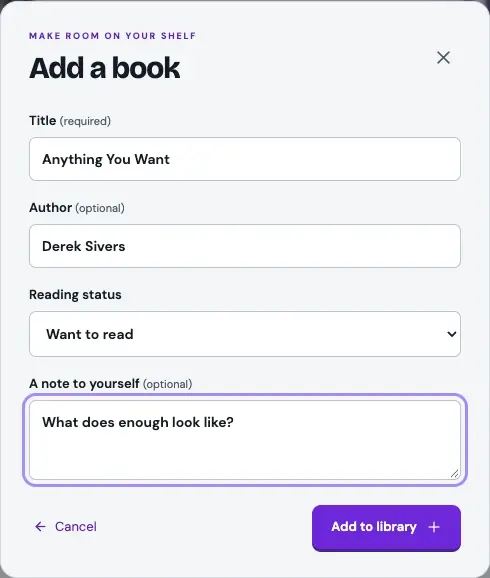
Open your style-guide page in another tab, at your app’s address with style-guide.html on the end, and compare. The buttons, the field, the corners and the spacing should be recognisably the same in both. If something differs, tell the agent which page is right and ask it to correct the tokens, not this one screen.
Now watch the same action travel to the server. Open the developer tools as you did in Part 5, choose Network and the Fetch/XHR filter, and add one more book. A row named books appears with the status 201, and clicking it shows the method POST: your client asked, and the server created the book and said so. It is the first time you have watched your own app talk to its server. From now on the Network tab is where you look when you want to know what was really sent and what really came back.
Then refresh the page. Your books disappear.
Now ask your agent to run the browser tests: “Run the browser tests and tell me which of my sentences pass.”
One should now be green: an empty title is rejected. The form exists, so that behaviour can be checked. The other three still fail, because nothing edits, removes or saves yet. Three failing tests is not a problem to fix; it is a list of what you have not built.
If the Network tab stays empty, check that Fetch/XHR is chosen and that the developer tools were open before you added the book. If the page is blank or shows an error, tell the agent what you did and paste the error in full.
4. Say what should change
Something in Stage B will probably differ from what you pictured. How you report it decides how well it gets fixed. “Make the form better” gives the agent nothing to aim for. Feedback an agent can use has three parts: what you did, what you expected and what happened instead.
I added a book with only a title. I expected the card to show just the title. Instead it shows the word “undefined” where the author would be.
The agent can reproduce that, find the cause and confirm the fix. Keep this pattern to hand:
Report a problem
I tried [exact steps]. I expected [result], but saw [actual result]. Reproduce the problem, explain the cause briefly, then fix it without changing anything else. Tell me how to check the fix myself.
Paste this into your project conversation.
A screenshot helps when the problem is visual, and you can paste an error message exactly as it appears. After a fix, repeat your original steps yourself. The agent’s report that something is fixed is a claim; your own check is the evidence.
If you find that your flow was wrong, and not the app, ask the agent to update docs/flows.md first, so that the plan and the app stay in agreement.
5. Write a prompt of your own
Not every change is a problem to report. Sometimes you simply want something different, and nobody has written that prompt for you. Write it the way the Stage B prompt was written, with the same three elements.
Pick one small thing you noticed while checking, something you can see on the screen. You might want the reading status shown as a small label on each card, or the note in smaller text beneath the author, or the add-book button somewhere else. Keep away from anything that would need a new piece of information about a book, such as a rating or a date, because the server decides what a book contains and the server doesn’t change.
Then write three sentences, one for each element. For example:
On each book card, show the reading status as a small label beside the title. Do not change the form, the wording or how books are added, and do not change anything in src/server. When you finish, stop and tell me which screen to look at and what I should see.
You don’t need to mention your tokens or your brand pack. AGENTS.md already tells your agent to take every value and every sentence from them, and it reads that file at the start of every conversation.
Send your prompt, then check the result like any other stage. Look for exactly what you asked for. Then check what you told it to leave alone: add a book, and confirm that the form and the celebration behave as they did before. If the result surprises you, look at your prompt before you blame the agent. Usually one of the three elements was missing or vague, and the fix is to say it again more exactly, using the pattern from step 2.
6. Edit, change status, remove and undo
Stage C makes the list editable. The prompt asks for three kinds of change, each sent to the server with its own method: PATCH to edit a book or move it between statuses, DELETE to remove one, and the server’s restore message to undo the most recent removal. It asks the agent to change the screen only after the server has answered, as in Stage B, and to keep the form usable from the keyboard. It fences off saving, the loading and failure messages, and search, which all belong to Part 7. It also leaves the stage’s last task, a standing rule for your agent, until step 7.
Stage C: edit, status and remove
Read docs/epics/04-build.md. Stage B is working. Do Stage C only, using docs/api.md, docs/flows.md and docs/brand/brand-pack.md, and do not change anything in src/server. Let me edit a book's details and move it between Want to read, Reading and Finished, using PATCH. Let me remove a book with DELETE, with an undo action that uses the server's restore message to put the most recently removed book back with its details, in its old position. Change the screen only after the server has answered each request. Use the brand pack's remove and undo wording. Keep keyboard use working: I should be able to move through the form with Tab, the focus outline should use the token focus colour, and Escape should close the form without saving. Do not add saving, loading or failure messages, search or filters yet, and leave the standing-rule task at the end of the stage until I ask for it. When you finish, stop, tell me what to try and wait for my feedback.
Paste this into your project conversation.
Check the result against your Edit and Remove flows:
- Correct a title and save. The card should update, and there should still be one book, not two.
- Open the edit form, change something, then press Escape. The book should be unchanged.
- Change a book’s status to Reading. The card should show the new status.
- Remove a book, then choose Undo. It should return with the same details, in the same place.
Keep the Network tab open while you do this, and each action shows up as its own row. For an edit, a status change or a removal, the row is named with the book’s long id and not books, because that one book is what the request is about. Only undo’s row has a readable name, restore. Click a row to see its method: PATCH for an edit or a status change, DELETE for a removal, and a POST to an address ending in restore for the undo. Each should be answered with 200. The file docs/api.md lists the same messages, so you can see that the client is asking for what the API says it should.
Then try one thing the prompt didn’t mention. Remove two books in a row and choose Undo: only the most recent returns, which is what the brief specifies. Exploring beyond the script is how you find what nobody planned for.
Then run the tests again.
Undo should now be green, and — this is the part worth pausing on — the empty-title test should still be green. Your agent has just rewritten how books are stored on screen, added three new kinds of change, and the thing you finished an hour ago still works. You did not check it. The test did.
That is the whole reason those tests were written before the features. Every stage from here adds behaviour on top of behaviour, and each time you run them you find out whether anything underneath has quietly moved. If a test that was passing starts failing, stop and fix what broke before going on: something you had finished is now broken, and it is far cheaper to find now than in Part 9 with a link already shared.
If an action does nothing, look at its row in the Network tab. A 400 or a 404 means the client asked for something the API doesn’t offer. Tell the agent which action you tried and which status code you saw, and ask it to compare the request with docs/api.md. If no row appears at all, the client sent nothing, so say that instead.
7. Give your agent a standing rule
At the start of this part you asked your agent whether the app was running, and for its address. You asked for much the same in earlier parts, and you would go on asking every time you sat down. A request that repeats like that belongs in the root file, AGENTS.md.
As you saw in Part 2, your agent reads the root file at the start of every conversation, which is how a new conversation already knew who you are. The file has a section called How we work. One line added there replaces a sentence you would otherwise keep typing. The rule of thumb: if you say it at the start of every session, it belongs in the root file. Something you want once stays in the conversation.
The last task of Stage C covers this, so the prompt is short. It asks for one line and nothing else, because everything in the root file is read every time and it should stay brief.
The line tells the agent to check before it starts anything. If it started a second development server while an earlier one was still running, the new one would get a different number at the end of its address, and as Part 5 explained, a different address has its own list. Once your books are saved, in Part 7, that would look as though they had vanished.
Make the start-up check a standing rule
Do the last task of Stage C in docs/epics/04-build.md. At the start of every session I ask you to get the app running and give me the address. Make that a standing rule: add this one short line under "How we work" in AGENTS.md, read it back to me, and change nothing else in the file: "At the start of a session, check whether the app is already running; if it is not, start it. Either way, give me the address."
Paste this into your project conversation.
The agent should read that single line back to you. Change the wording with the agent if you like, as long as the line still tells it to check before it starts anything.
Now see the rule work. Start a new conversation in the same project, as you did in Part 2, and type only this:
I’m back, ready to carry on.
If it greets you and waits, ask: “What does AGENTS.md tell you to do at the start of a session?” If the line is there, the agent will usually act on it once reminded. The root file is strong guidance and not a guarantee, so an agent will occasionally need the nudge. If the line is missing, paste the prompt above again. If it starts a second server and the number at the end of the address changes, tell it: “Stop the server you just started, and give me the address of the one that was already running.”
8. Save a checkpoint
Finish as you have before: have the agent look at what changed, record it and save a checkpoint with a name. If a later stage goes badly, you can return to this working state.
Save a checkpoint
Inspect the changes and tell me in a sentence or two what changed. Bring docs/progress.md up to date, then save a checkpoint called "Add, edit and remove books". Do not push or publish anything.
Paste this into your project conversation.
The agent should tell you what changed, including the new line in AGENTS.md, and confirm that the checkpoint is saved on your computer.
You now have a reading list you can add to, edit and undo, a prompt you wrote yourself, and an agent that starts each session the way you like. Next, in Part 7, you give the server somewhere lasting to keep the list, so that your books are still there after a refresh.
FAQ
The agent built more than I asked for. What now?
Tell it plainly which stage you asked for and that you want to check that stage first. If the extra work gets in the way, ask it to return to your last checkpoint and repeat the stage. A search box that arrives early does no harm, but you haven’t checked it yet.
The agent wants to change something in src/server. Should I let it?
No. The stand-in server is supplied and tested, and the client is meant to fit the API as docs/api.md describes it. If the agent believes the server is wrong, ask it to show you the request it sent, the response it got and the line of docs/api.md it expected something different from. Almost always the client is what needs to change.
The Network tab stays empty when I add a book. Why?
Check that the Fetch/XHR filter is chosen and that the developer tools were open before you added the book. If a note at the foot of your app says the stand-in server is running inside the page, your browser has not allowed the part of the server that makes requests visible, which can happen in some private windows. The app still works. Use an ordinary Chrome window to see the requests.
What else should go in the root file?
Very little. Add a line when you notice that you have given the same instruction, or made the same correction, at the start of more than one session. Leave out anything that is true only for the task in hand, and anything the agent can find in the project’s other files.
Should I paste the finished project over mine?
No need. The complete project ZIP is a separate reference. Open it in another folder if you want to compare behaviour without overwriting your work.
Further reading
- Best practices for Claude CodeAnthropic
Written for developers, so skip the parts about existing codebases. The advice on giving specific instructions, correcting course early and starting a fresh conversation applies to everyone.